Stratigraphic Data Processing and Section Plots
This package provides tools for data processing and generating
stratigraphic sections for volcanic deposits and tephrastratigraphy.
Package was developed for studies on Alaska volcanoes (“av”) where
stratigraphic (“strat”) figures are needed for interpreting eruptive
histories, but the methods are applicable to any sediment stratigraphy
project. The primary outputs are ggplot figures of stratigraphic
sections–ggstrat(), ggstrat_column(),
ggstrat_sampleID()-but the data processing logic
add_depths() and add_layer_widths() enable
motivated users to create custom visualizations. Various load_data
functions facilitate ingesting from stratigraphic layer data
templates.
You can install avstrat from CRAN or from a downloaded source file off the GitLab approved repository (Code - Download source code - tar.gz). For option 2, you’ll need to download the source repo as a tar.gz and map the path to the location on your computer (replace “path/to” with the file path on your local computer where you save the download).
{r eval=FALSE}
# Option 1: Install from CRAN:
install.packages("avstrat")

# Option 2: Install from source file:
install.packages("path/to/avstrat_0.0.0.9000.tar.gz", repos = NULL, type = "source")
To install the development version, use the ‘devtools’ package.
devtools::install_gitlab("vsc/tephra/tools/avstrat",
                        host = "code.usgs.gov",
                        build_vignettes = TRUE)
You can also install the development version from a mirrored repo on Github.
devtools::install_github(
  "https://github.com/mwloewen/avstrat",
  build_vignettes = TRUE
)To upload data from GeoDIVA submission templates (Stations-Samples
and Layers), you will need to have two excel files that match GeoDIVA
upload templates. Examples can be found in this repo under
inst/extdata/example_layers_upload_2024.xlsx and
inst/extdata/example_samples_stations_upload_2024.xlsx. In
the code chunk below, replace “path_layers.xlsx” with the file path and
file name of your files.
library(readxl)
library(avstrat)

data_strat <- load_geodiva_forms(
   station_sample_upload =
     readxl::read_excel("path/to/samples_stations_upload.xlsx", sheet = "Data"),
   layer_upload =
     readxl::read_excel("path/to/layers_upload.xlsx", sheet = "Data")
 )
The GeoDIVA templates have some idiosyncrasies unique to Alaska
Volcano Observatory projects and database history. Most people may find
a more generic upload template more useful, and there is an upload
function for that too! See
inst/extdata/example_inputs.xlsx, which includes data tabs
broken down into different data types: stations, sections, layers, and
samples. These can be partially merged (e.g., “stations_sections”) or
separate. Samples can be linked to layers as a nested list (similar to
the GeoDIVA layer upload, “layers-sample”) or each sample linked to a
single layer (“samples_layer”). Using the later option:
data_strat <- load_stratdata_indiv(
  stations_upload = readxl::read_xlsx("path/to/example_inputs.xlsx",
                                      sheet = "stations"),
  sections_upload = readxl::read_xlsx("path/to/example_inputs.xlsx",
                                      sheet = "sections"),
  layers_upload = readxl::read_xlsx("path/to/example_inputs.xlsx",
                                      sheet = "layers"),
  samples_upload = readxl::read_xlsx("path/to/example_inputs.xlsx",
                                      sheet = "samples_layer"),
)
Once you have the data in your environment, you can make a basic stratigraphic plot and use the avstrat theme:
library(ggplot2)
#> Warning: package 'ggplot2' was built under R version 4.4.3
library(readxl)
#> Warning: package 'readxl' was built under R version 4.4.3
library(avstrat)
# Load data (this is a pre-loaded example dataset that is part of avstrat)
data_strat <- example_data_strat

# Set theme
theme_set(theme_avstrat())

# Produce a strat section
ggstrat(df = data_strat, section_name = '21LSHD02')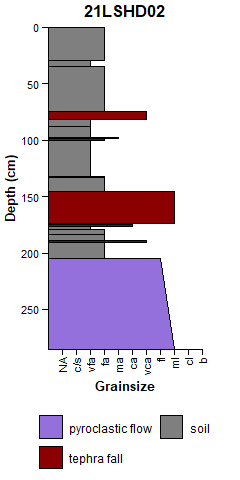
You can also plot sample identification along side the section. and combine them with the patchwork package.
library(patchwork)
#> Warning: package 'patchwork' was built under R version 4.4.3
p1 <- ggstrat(df = data_strat, section_name = '21LSHD02')
p2 <- ggstrat_label(df = data_strat, section_name = '21LSHD02')

p1 + p2
#> Warning in grid.Call.graphics(C_text, as.graphicsAnnot(x$label), x$x, x$y, :
#> font family not found in Windows font database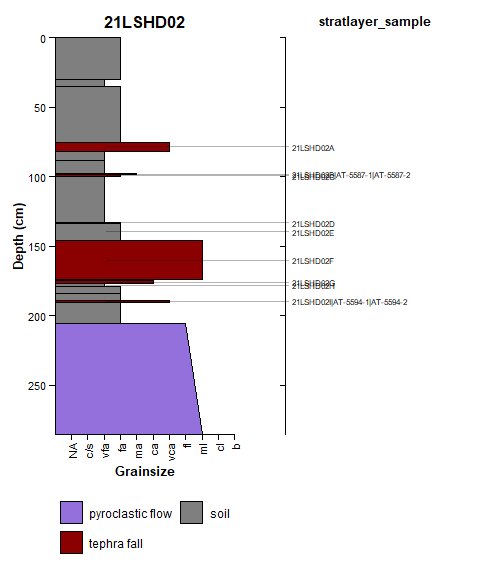
More examples and demonstration of how to create your own custom plots will be provided [eventually] in vignettes! Currently, a more detailed workflow can be accessed with the installed package at:
vignette("avstrat-workflow-examples", package = "avstrat")If you find problems with this package or have features you’d like to see, please open an issue or consider contributing yourself, I would love to have more contributors to the package!
License: This project is in the public domain.
Disclaimer: This software is preliminary or provisional and is subject to revision.