


tutorizeR is an R package for converting existing R
Markdown (.Rmd) and Quarto (.qmd) teaching
material into interactive tutorial documents for learnr and
quarto-live.
The package is designed for instructors who want to keep one source document while generating student-facing exercises, solution scaffolds, multiple-choice questions, and conversion reports. The core workflow is source-first: revise the lesson source, rerun the conversion, review the generated tutorial, and distribute the result through the course infrastructure already in use.
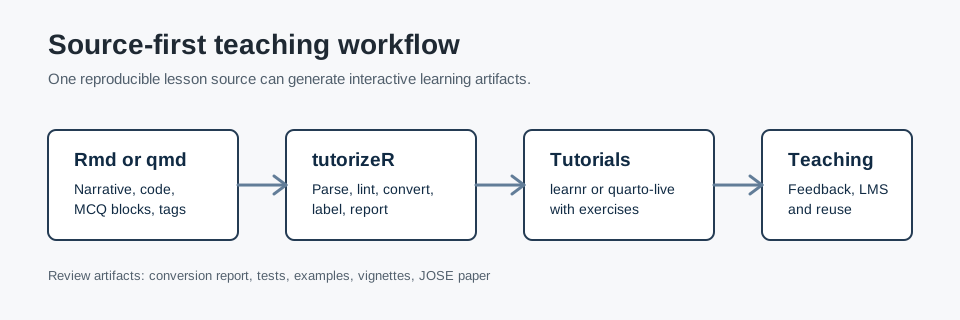
tutorizeR supports the following teaching workflows:
.Rmd and .qmd lessons to
learnr tutorials..qmd lessons to
quarto-live-oriented resources.The package does not replace instructor review. Generated tutorials should be inspected before they are used with students, especially when assessment, feedback, or grading logic is involved.
The repository currently demonstrates package functionality through tests, vignettes, documentation, and an installable example module. It does not currently contain formal classroom outcome data or measured learning-gain evidence.
Choose the installation source that matches your use case.
# CRAN, once the package is available there
install.packages("tutorizeR")
# Tagged GitHub release
install.packages("remotes")
remotes::install_github("AurelienNicosiaULaval/tutorizeR@v0.4.5")# Current development branch used for review work
install.packages("remotes")
remotes::install_github("AurelienNicosiaULaval/tutorizeR@review/jose-readiness")The installed example module contains a Quarto lesson, a small local
dataset, a question bank, and expected outputs. The following example
copies the lesson to a temporary directory and converts it to a
learnr tutorial.
library(tutorizeR)

example_dir <- system.file(
  "examples",
  "example_course_module",
  package = "tutorizeR"
)

work_dir <- file.path(tempdir(), "tutorizeR-example")
dir.create(work_dir, recursive = TRUE, showWarnings = FALSE)

file.copy(
  from = file.path(example_dir, "lesson-source.qmd"),
  to = work_dir,
  overwrite = TRUE
)
file.copy(
  from = file.path(example_dir, "student_activity.csv"),
  to = work_dir,
  overwrite = TRUE
)

question_bank <- load_question_bank(file.path(example_dir, "question-bank"))

report <- tutorize(
  input = file.path(work_dir, "lesson-source.qmd"),
  output_dir = work_dir,
  format = "learnr",
  assessment = "both",
  question_bank = question_bank,
  mcq_source = "mixed",
  overwrite = TRUE,
  verbose = FALSE
)

print(report)
The returned report records the input file, output file, output format, assessment mode, generated exercises, generated MCQs, lint summary, warnings, and render status when applicable.
| Task | Functions |
|---|---|
| Convert one lesson | tutorize(), convert_to_tutorial() |
| Convert a folder | convert_folder() |
| Work with question banks | load_question_bank(),
validate_question_bank() |
| Check lesson structure | lint_source(), validate_input(),
validate_output() |
| Save conversion metadata | write_tutorize_report() |
| Export course integration artifacts | export_lms_manifest(),
export_tutorial_package() |
| Use RStudio addins | launch_tutorizeR_addin(),
launch_tutorizeR_folder_addin(),
launch_tutorizeR_preview_addin() |
Instructor comments inside R chunks control conversion.
# tutorizeR: hints=Group by program before summarising|Use .groups = "drop"
activity |>
  dplyr::group_by(program) |>
  dplyr::summarise(
    mean_hours = mean(study_hours),
    mean_score = mean(quiz_score),
    .groups = "drop"
  )
Supported tags include:
skipexercise-onlysolution-onlymcqnarrative-onlylockedhints=Hint 1|Hint 2Inline MCQs use YAML inside a tutorizeR-mcq fenced
block.
question: "Which variable identifies the academic program?"
answers:
  - text: "program"
    correct: true
  - text: "quiz_score"
    correct: false
Reusable question-bank references use YAML inside a
tutorizeR-mcq-ref fenced block.
ids: [visualization-aesthetic]
strategy: ordered
shuffle_answers: falselibrary(tutorizeR)
course_dir <- file.path(tempdir(), "course")
question_bank <- load_question_bank(file.path(course_dir, "question-bank"))
folder_report <- convert_folder(
dir = file.path(course_dir, "lessons"),
recursive = TRUE,
output_dir = file.path(course_dir, "tutorials"),
format = "learnr",
assessment = "both",
question_bank = question_bank,
mcq_source = "mixed",
lint_strict = TRUE,
overwrite = TRUE
)
print(folder_report)The package includes vignettes that are also used as pkgdown articles:
The pkgdown site configuration is stored in
_pkgdown.yml. The generated site is built into
pkgdown/ so it does not overwrite the repository’s source
documentation in docs/.
pkgdown::build_site()Recommended local checks for maintainers:
Rscript -e "testthat::test_local('.')"
Rscript -e "lintr::lint_package()"
Rscript -e "urlchecker::url_check()"
Rscript -e "devtools::document()"
R CMD build .
R CMD check --as-cran tutorizeR_0.4.5.tar.gz
Installed example smoke test:
Rscript -e "source(system.file('examples', 'example_course_module', 'run-example.R', package = 'tutorizeR'))"learnr render checks require learnr to be
installed.learnr tutorials activate
gradethis setup only when gradethis is
installed.quarto-live output requires the Quarto live extension
in the teaching project.Reviewer-facing JOSE and JOSS preparation materials are maintained in
the source repository under docs/ and paper/.
These files are intentionally kept separate from the CRAN package
contents. Claims about classroom deployment, broad adoption, or learning
outcomes should be added only when supported by verifiable repository
evidence.
The package code is released under the MIT license. The CRAN-style
license metadata is stored in LICENSE, and the full MIT
license text is available in LICENSE.md.
Educational example materials in inst/examples/,
generated expected educational outputs, and graphical documentation
assets in man/figures/ are released under CC-BY 4.0 unless
otherwise specified. See LICENSE-CONTENT.md and
LICENSES.md in the source repository.