


Live, mood-driven mascots for Shiny apps and Quarto sites. A character drawn in code shows a mood and gives a short wiggle when the mood changes, with status text beside it so the face never carries meaning alone.
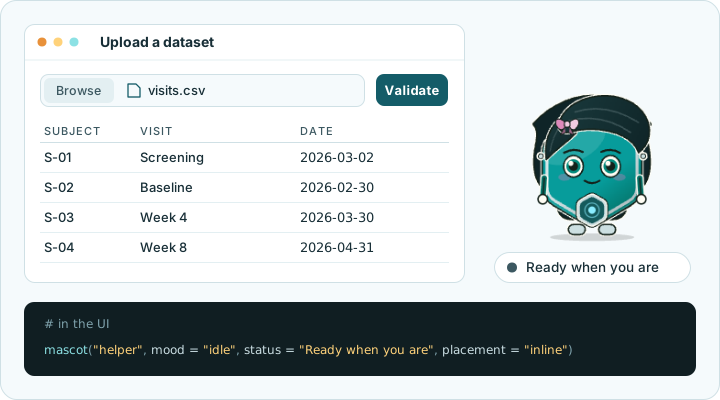
Set the mood from R when a form needs attention or a task finishes.
Mascots follow light and dark mode, can use your brand colours, work
offline and respect reduced-motion settings. The package is built for
GxP work: use it alongside your app’s field errors and
results.
Status: some features are experimental.
Get started · Meet your mascots · Function reference
mascot needs R 4.1.0 or later. Install the released version from CRAN:
install.packages("mascot")Or install the development version from GitHub:
# install.packages("pak")
pak::pak("insightsurge/mascot")Explore the characters and functions in a local app, change the
controls and copy the R code that matches what you see. The studio is
experimental and needs the optional packages bslib (0.7.0
or later) and knitr installed.
mascot::mascot_studio()Run this in an interactive R session. The studio works offline and offers only the built-in characters. See the studio guide for each function.
Put this in app.R and run it. Click Say
hello to change Tessa’s mood from idle to happy and update the
status text. Tessa gives a short wiggle as her mood changes, unless the
visitor has asked for reduced motion.
library(shiny)
library(mascot)

ui <- fluidPage(
  mascot(
    "helper",
    mood = "idle",
    status = "Ready to greet you",
    placement = "inline"
  ),
  actionButton("greet", "Say hello")
)

server <- function(input, output, session) {
  observeEvent(input$greet, {
    update_mascot("helper", mood = "happy", status = "Hello!")
  })
}

shinyApp(ui, server)
The four built-in characters are Tessa, Sela, Knurl and Neer. They
share five moods: "idle", "thinking",
"happy", "worried" and
"celebrating". Use mascot() in the UI and
update_mascot() in the server to reflect your app’s state.
The Get
started article covers forms, long tasks, themes and more
examples.
Put this in an R chunk in a Quarto HTML page:
mascot::mascot("helper", mood = "happy", status = "Rendered with Quarto", placement = "inline")Here the mascot is static. Its mood and status are set when the page
is rendered, and it gets no live Shiny updates. See Get
started for details and caveats. A Quarto shortcode is
planned for 0.2.0.
Tessa and Sela are stable. The following are experimental and may
change in a later release: Knurl and Neer, mascot_studio(),
mascot_preview(), mascot_theme(css =),
drag = "free", the mapping of
bslib::bs_theme() colours to character parts, and the
character file format.
You can read a local JSON character file with
mascot_read_character() or check JSON text or a parsed list
with mascot_check_character(). Both functions are
experimental; their arguments, results and diagnostics may change in a
later release. You can preview a checked character and use it in Shiny;
the studio does not take custom characters yet. Public functions for
saving and registering characters and palettes are planned for a later
release. See Make
your own character.
The coverage badge counts the R code the tests run. The JavaScript engine that draws and animates the mascots is tested in a browser and is not part of that figure.
The scope and planned releases and known users give the wider context.
Start with the documentation. To report a bug or suggest a feature, open an issue using the matching form. Include a small example that shows the problem, built on synthetic data, and say which package version you have.
For contributions, read the contributor guide, including its conduct and data guidance. Everyone taking part is asked to follow the code of conduct. To report a security problem privately, see the security policy. The engineering standards explain the package’s checks and conventions.
MIT. See the licence.